
Stake Registration: a field-by-field walkthrough of creating your account
The sign-up form is short, but a couple of choices made at this stage (your code, your username, your security settings) are hard to change later. Here is exactly what to expect from the first click to your first deposit.
What each field is for
Use an inbox you check; Stake sends a verification link and security alerts here. You can swap to social sign-in (Google, Facebook, Line or Twitch) instead.
Public in chat, races and leaderboards, and permanent. Avoid using your real name or anything that identifies you.
Twelve characters or more from a password manager. You will add two-factor authentication after registering.
Must match your ID later. You need to be 18 or older, or the legal age in your province if that is higher.
Expand this field and enter the code to activate rakeback immediately. If you skip it, you have 24 hours to add it under Settings → Offers.
Confirms your age and acceptance of Stake's terms, including its regional restrictions and responsible gambling policy.
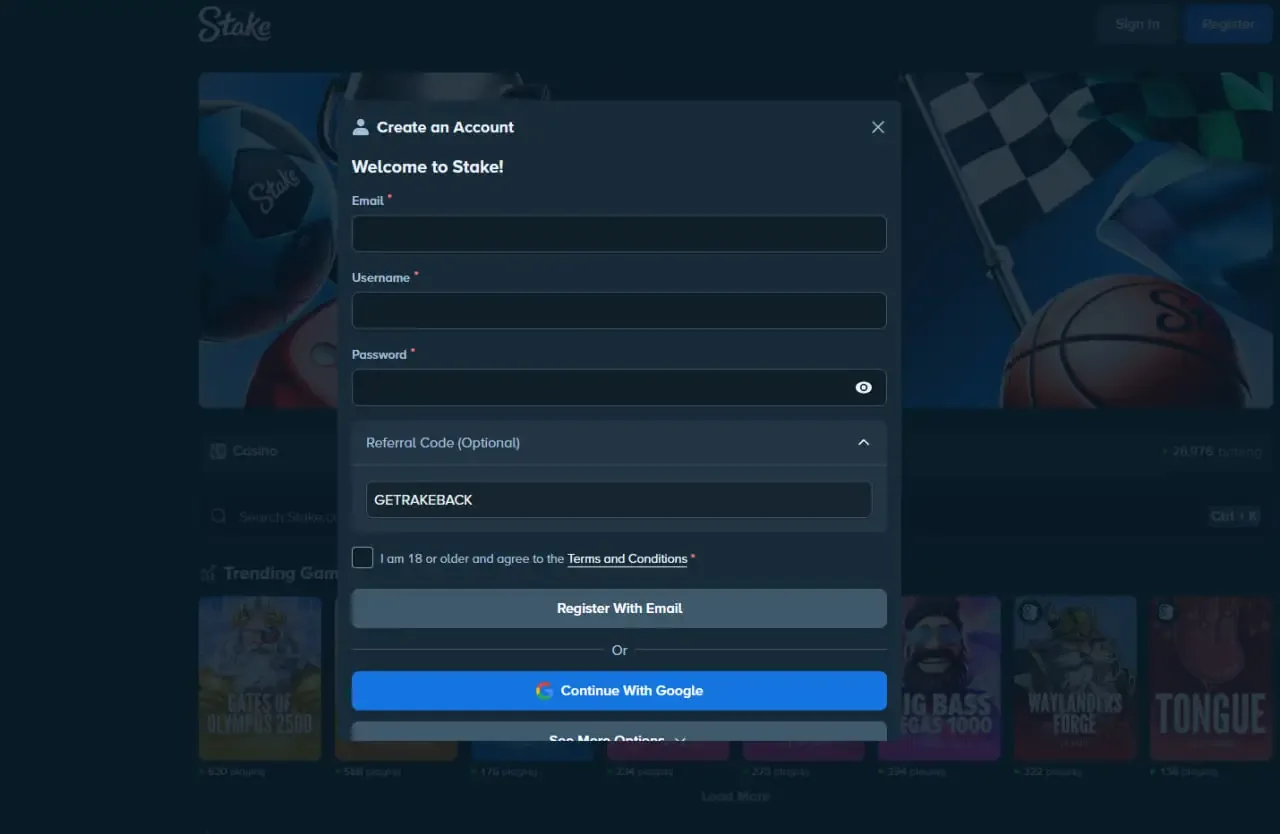
One field, two purposes
The same optional field accepts both promotional codes and a friend's referral code. Whichever you enter sets your welcome offer. To unlock rakeback, enter GETRAKEBACK. Read the referral program guide if you are unsure which applies to you.
Setup steps that take you from new account to first bet
Verify your email
Click the link Stake sends. Until you do, some features, including withdrawals and the offer field, may be limited.
Turn on two-factor authentication
Settings → Security. Scan the QR code with Google Authenticator, Authy or a similar app and store the backup key offline.
Set your display currency
Choose CA$ under wallet settings if you prefer to see balances in Canadian dollars. Funds still sit in whichever crypto you deposit.
Confirm the offer is active
Check Settings → Offers. If the code was accepted you will see rakeback listed; if not, enter it now while inside the 24-hour window.
Make a first deposit
Wallet → Deposit, pick a coin, copy the address or scan the QR code. Start with a small amount to confirm the network and timing.
Explore responsibly
Set deposit and loss limits from the responsible gambling page before you play, not after. Limits take effect immediately; increases are delayed.
Identity checks: what Stake asks for and when
Stake uses tiered verification. Level 1 is completed at registration. Higher levels are requested when you withdraw larger amounts, trigger a review, or want access to certain payment methods.
| Level | What you provide | When it is needed |
|---|---|---|
| 1 | Name, date of birth, address, email confirmation | Sign-up and basic play |
| 2 | Government photo ID (passport, driver's licence or provincial ID) | Before larger withdrawals or on request |
| 3 | Proof of address such as a utility bill or bank statement dated within 3 months | Higher limits, compliance review |
| 4 | Source-of-funds documentation | High-volume accounts |
Tips that avoid delays
- Photograph documents flat, in daylight, with all four corners visible.
- Match the name and address exactly to what you typed at sign-up.
- Upload from the device the photo was taken on to keep full resolution.
- Expect a few hours to a couple of days for review; chat support can check status.
Security considerations
- Never share your login, 2FA codes or seed phrase; Stake staff do not ask for them.
- Keep withdrawal addresses in your own wallet, not an exchange's custodial address, unless you have confirmed the exchange accepts gambling transfers.
- One account per person. Multiple accounts lead to closure and forfeited balances.
Same form, any screen
Browser window
Click Register in the top-right corner of stake.com. The form opens as a dialog over the lobby; your email client and password manager are right there for the verification step.
Mobile browser or home-screen app
The Register button sits in the top bar. The form is identical, and social sign-in is often quicker on a phone. See the mobile guide for the home-screen install.
One account everywhere
Log in on any device and your wallet, bets, VIP progress and rakeback balance follow you. Review active sessions under Security if you use shared computers.
Sign-up questions from Canadian players
No. Stake is not available to residents of Ontario, and it may apply other regional restrictions. Its geolocation checks run at sign-up and during play. Review the restricted-jurisdictions list in Stake's terms before you create an account.
No. Registration and the code field are separate from depositing. You can explore the lobby and set limits before funding the account.
Not if your account is less than 24 hours old. Go to Settings → Offers, enter GETRAKEBACK and submit. After 24 hours the field closes, and only live chat can review the situation.
Usernames are permanent on Stake, so choose one you are comfortable with appearing in public chat and leaderboards.
Basic details are required for everyone. Document uploads are triggered by withdrawal size, payment method or a compliance request. Completing them early prevents delays when you want to cash out.
Open the form and enter the code
Registration takes about two minutes. Add GETRAKEBACK in the optional field and rakeback is live before you deposit.